We're thrilled to announce Mayson's Pre-Seed funding round!
We're thrilled to announce Mayson's Pre-Seed funding round!
What is a database, and why does my app need one
What is a database, and why does my app need one

A database is an organised system for storing, retrieving, and managing the information your app needs to function. Without one, your app has no memory; nothing a user does persists beyond the moment they do it. They sign up, and on the next page load, your app has already forgotten them. They place an order, write a message, save a preference — gone. A database provides an app with continuity. Software without a database can execute instructions. It cannot remember anything.
What a database is in plain English
The word "database" sounds more complicated than the concept warrants.
Think about what a library does. It holds a large collection of information, organised so that any particular piece can be found quickly. The filing system matters — if books were stacked randomly, finding anything would take hours. The library's value isn't storage alone; it's structured storage with built-in retrieval.
A database does the same thing for your app's information, except instead of books it holds records — a user's name and email address, an order's status and timestamp, a product's price and stock count — and instead of a librarian it uses a query language (a set of instructions for asking the database to find or modify specific records) to retrieve exactly what the app needs, in milliseconds.
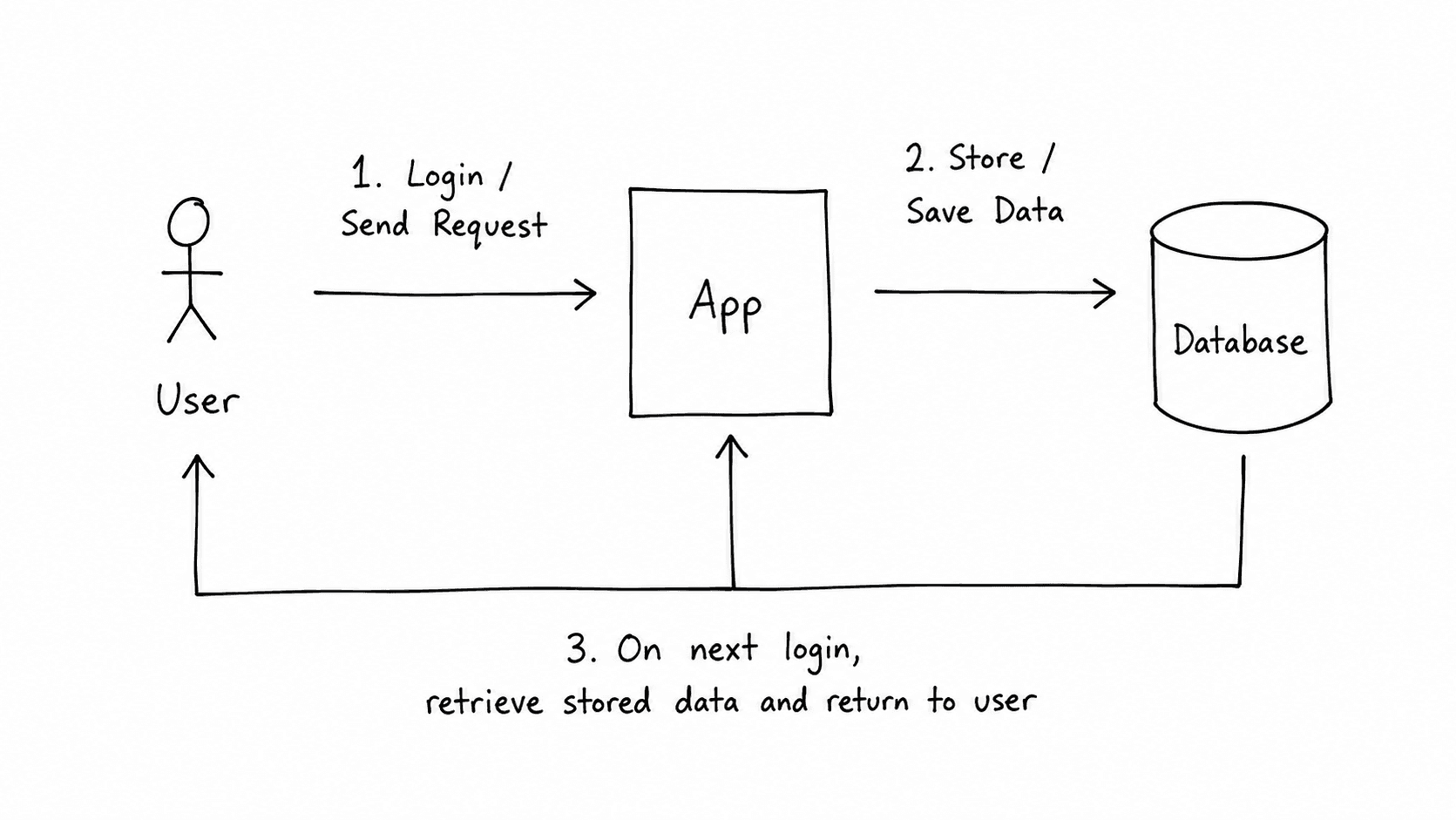
The database is separate from the app's code. The code is the logic — what the app does. The database is the memory — what the app knows. When a user logs in, the code says, "Check if this email and password combination exists." The database is where it checks. When a user's profile loads, the code says, "fetch this user's details." The database is what it fetches from.
My daughter once asked me, when she was learning Python and had built a small to-do app, why her tasks disappeared every time she stopped the program. Her code was holding the tasks in the running programme's memory rather than in a database. Memory is temporary. A database is persistent. That's the core distinction.
What your app would look like without a database
It's worth being concrete about this, because "your app needs a database" can sound like generic advice until you follow the consequences through.
Without a database, your app can still run — but it can only work with information that either lives in the code itself (hardcoded, meaning you wrote it directly into the programme and users cannot change it) or in the temporary memory of the running server, which disappears on restart.
Here's what that means in practice.
A user signs up for your app. Without a database, there's nowhere to store that signup. The server might acknowledge the request, but the moment that server process ends or restarts — which happens regularly on any cloud platform, through deployments or automatic recovery after crashes — the record is gone. The user tries to log in the next day and finds their account doesn't exist.
A customer places an order on your platform. Without a database, the order exists only in that server's memory for the duration of that request. There's no order history. There's no way to confirm fulfilment. There's no record for your accountant.
A founder I spoke to recently described building their first prototype exactly this way — convinced that because the app worked during a demo, it was ready to show investors. The demo ran on a single server in a single session. What they'd built was less a product than an elaborate illusion of one. The moment a second user tried to access it simultaneously, the state broke.
Every app that handles users, transactions, or any information that needs to exist after the current moment needs a database. Not as a technical nicety — as a structural requirement.
The two main types of databases that non-technical founders encounter
The database world is considerably more complex than this section covers, but for a non-technical founder evaluating an app builder or working with an early team, two families of databases account for almost everything you'll encounter.
Relational databases — PostgreSQL, MySQL, and SQLite are the most common names you'll hear — organise data into tables, which are structured like spreadsheets: columns define what type of information is stored, rows contain individual records. The "relational" part refers to the ability to define connections between tables: a user's table connects to an orders table because each order belongs to a user. This structure enforces consistency. You can't have an order without a user. You can't have a column that holds a phone number accidentally receive someone's date of birth.
PostgreSQL has been the default choice for production web applications for over a decade. It handles concurrent users reliably and has a track record in fintech environments where correctness matters more than speed.
Non-relational databases — MongoDB is the most widely known — store data in documents rather than tables. A document looks more like a JSON file: a single record that can contain nested information of varying shapes. This suits applications where the data structure isn't uniform or changes frequently during development.
For most apps, founders build at the early stage — user accounts, transactional records, content, preferences — a relational database is the right starting point. The structure it imposes turns out to be a useful discipline: it forces you to think clearly about what data you have and how it relates to one another before you start storing it. That clarity has value long before performance becomes a concern.
What a database stores: rows, tables, and relationships
A concrete example makes this easier to follow.
Say you're building a booking platform. Users create accounts and book appointments with service providers. In a relational database, this breaks down into three tables.
A user's table holds one row per user — each row containing a unique identifier (called a primary key, a number or string that identifies that record and nothing else), the user's name, email address, and hashed password. Hashed means the password has been transformed through a one-way cryptographic function before storage, so the database never holds the raw password — only a version of it that can be verified but not reversed.
A provider's table holds one row per service provider, with their name, service type, and availability.
A bookings table connects the two. Each row contains a booking identifier, the identifier of the user who made it, the identifier of the provider they booked with, and the date and time. Those user and provider identifiers are foreign keys — references to records in the other tables — which is how the relationship between tables is expressed structurally rather than assumed.
When a user logs in and views their upcoming bookings, the app runs a query — a structured question posed to the database — that asks: "Find all rows in the bookings table where the user identifier matches this user, and return the associated provider details and times." The database answers in milliseconds.
I've reviewed database schemas built by first-time founders that lacked primary keys on several tables, foreign key constraints, and a users table with an email column that had no uniqueness requirement. All of these things work fine with ten test records. They become problems at ten thousand real ones.
How your app talks to its database
The connection between your app's code and its database is mediated by queries. A query is a structured instruction that asks the database to find, create, update, or delete records. In relational databases, queries are written in SQL — Structured Query Language, a standardised language for communicating with relational databases that has been in use since the 1970s.
A query to find all users who signed up in the last seven days looks roughly like this:
sql
SELECT * FROM users WHERE created_at > NOW() - INTERVAL '7 days';
Most application code doesn't write raw SQL. It uses an ORM (Object-Relational Mapper), a library that translates between the objects the code works with and the database records they correspond to. The ORM means a developer writes User.findRecentSignups() rather than the SQL above, and the library handles the translation.
You don't need to understand SQL to build an app with an AI builder. Knowing that this layer exists helps you understand what's happening when something goes wrong — and something will eventually go wrong, because databases are where most application behaviour is rooted.
What happens to your database when your app gets real users
Database design decisions made early have a long reach. This matters more than most early-stage founders expect.
The most common problem is missing indexes. An index is a data structure that allows the database to find records quickly without scanning every row — think of it as a book's index rather than having to read every page to find a term. Without indexes on the columns your app queries most often, every lookup scans the entire table. With ten rows, this takes microseconds. With a hundred thousand rows, it takes seconds. With a million rows, it doesn't complete in time.
The second common problem is the N+1 query — a pattern where the app runs one query to retrieve a list of records, then runs an additional query for each record to fetch related information. For a list of 20 bookings, this produces 21 database queries instead of 1. Under load, the cost compounds quickly.
The Cloudflare engineering blog has a postmortem from 2019 documenting a database-level failure that cascaded into a broader outage — a concrete example of how database behaviour under load differs from database behaviour in development, and why that gap deserves respect before you find out about it from users.
I have reviewed codebases where six months of technical debt traced directly to database design decisions made in the first week. The schema that made sense for a prototype became a structural constraint that shaped everything built on top of it.
What to look for when choosing how your app's database is set up
When you're evaluating an app builder or working with an early engineering team, this question is worth asking directly.
There are two broad approaches in the current AI-assisted app-building landscape.
The first is a managed third-party database service — a separate platform your app connects to. Your app lives in one place; your data lives in another, managed by a service with its own pricing, terms, and infrastructure. This is a legitimate architectural choice and many teams use it well, but it introduces a dependency: if the service changes its pricing model, alters its API, or shuts down, your data situation changes with it. Portability requires explicit planning.
The second is a database generated as native code inside your own codebase — the schema, the connection logic, and the migration files live in your repository alongside your application code. You own the database definition the same way you own the rest of the app. Moving to a different hosting environment means taking your repository with you, including the database setup.
Mayson takes the second approach — the database is generated as part of the application's codebase rather than as a connected external service. As an architectural observation: this gives the owner more direct control over the data layer and reduces platform dependency. It's worth understanding which approach any tool you evaluate uses, because it determines what "owning your data" actually means in practice.
One more thing worth understanding: an AI app builder can generate a database schema — the structure that defines what tables exist, what columns they contain, and how they relate — but only you know whether that schema matches your product. The tool generates a user's table with standard fields. If your product has a concept that doesn't fit that standard structure — bookings that can have multiple statuses, products with variant-level pricing, a permission model more complex than "admin" and "user" — you need to understand your schema well enough to know whether it captures that correctly. A tool can set up the database. The data model is still a product decision.
Frequently asked questions
Does every app need a database, or only complex ones?
What's the difference between a database and a spreadsheet?
What happens to my data if the platform I built my app on shuts down?
Do I need to understand databases to build an app with an AI app builder?
What's the difference between SQL and NoSQL, and does it matter for my app?
How do I know if my database is set up correctly for real users?
Navya has spent fifteen years building and breaking backend systems, mostly in payments and fintech. She now consults for engineering teams and writes about the technical concepts founders encounter when building real products. She is based in Bangalore.
A database is an organised system for storing, retrieving, and managing the information your app needs to function. Without one, your app has no memory; nothing a user does persists beyond the moment they do it. They sign up, and on the next page load, your app has already forgotten them. They place an order, write a message, save a preference — gone. A database provides an app with continuity. Software without a database can execute instructions. It cannot remember anything.
What a database is in plain English
The word "database" sounds more complicated than the concept warrants.
Think about what a library does. It holds a large collection of information, organised so that any particular piece can be found quickly. The filing system matters — if books were stacked randomly, finding anything would take hours. The library's value isn't storage alone; it's structured storage with built-in retrieval.
A database does the same thing for your app's information, except instead of books it holds records — a user's name and email address, an order's status and timestamp, a product's price and stock count — and instead of a librarian it uses a query language (a set of instructions for asking the database to find or modify specific records) to retrieve exactly what the app needs, in milliseconds.
The database is separate from the app's code. The code is the logic — what the app does. The database is the memory — what the app knows. When a user logs in, the code says, "Check if this email and password combination exists." The database is where it checks. When a user's profile loads, the code says, "fetch this user's details." The database is what it fetches from.
My daughter once asked me, when she was learning Python and had built a small to-do app, why her tasks disappeared every time she stopped the program. Her code was holding the tasks in the running programme's memory rather than in a database. Memory is temporary. A database is persistent. That's the core distinction.
What your app would look like without a database
It's worth being concrete about this, because "your app needs a database" can sound like generic advice until you follow the consequences through.
Without a database, your app can still run — but it can only work with information that either lives in the code itself (hardcoded, meaning you wrote it directly into the programme and users cannot change it) or in the temporary memory of the running server, which disappears on restart.
Here's what that means in practice.
A user signs up for your app. Without a database, there's nowhere to store that signup. The server might acknowledge the request, but the moment that server process ends or restarts — which happens regularly on any cloud platform, through deployments or automatic recovery after crashes — the record is gone. The user tries to log in the next day and finds their account doesn't exist.
A customer places an order on your platform. Without a database, the order exists only in that server's memory for the duration of that request. There's no order history. There's no way to confirm fulfilment. There's no record for your accountant.
A founder I spoke to recently described building their first prototype exactly this way — convinced that because the app worked during a demo, it was ready to show investors. The demo ran on a single server in a single session. What they'd built was less a product than an elaborate illusion of one. The moment a second user tried to access it simultaneously, the state broke.
Every app that handles users, transactions, or any information that needs to exist after the current moment needs a database. Not as a technical nicety — as a structural requirement.
The two main types of databases that non-technical founders encounter
The database world is considerably more complex than this section covers, but for a non-technical founder evaluating an app builder or working with an early team, two families of databases account for almost everything you'll encounter.
Relational databases — PostgreSQL, MySQL, and SQLite are the most common names you'll hear — organise data into tables, which are structured like spreadsheets: columns define what type of information is stored, rows contain individual records. The "relational" part refers to the ability to define connections between tables: a user's table connects to an orders table because each order belongs to a user. This structure enforces consistency. You can't have an order without a user. You can't have a column that holds a phone number accidentally receive someone's date of birth.
PostgreSQL has been the default choice for production web applications for over a decade. It handles concurrent users reliably and has a track record in fintech environments where correctness matters more than speed.
Non-relational databases — MongoDB is the most widely known — store data in documents rather than tables. A document looks more like a JSON file: a single record that can contain nested information of varying shapes. This suits applications where the data structure isn't uniform or changes frequently during development.
For most apps, founders build at the early stage — user accounts, transactional records, content, preferences — a relational database is the right starting point. The structure it imposes turns out to be a useful discipline: it forces you to think clearly about what data you have and how it relates to one another before you start storing it. That clarity has value long before performance becomes a concern.
What a database stores: rows, tables, and relationships
A concrete example makes this easier to follow.
Say you're building a booking platform. Users create accounts and book appointments with service providers. In a relational database, this breaks down into three tables.
A user's table holds one row per user — each row containing a unique identifier (called a primary key, a number or string that identifies that record and nothing else), the user's name, email address, and hashed password. Hashed means the password has been transformed through a one-way cryptographic function before storage, so the database never holds the raw password — only a version of it that can be verified but not reversed.
A provider's table holds one row per service provider, with their name, service type, and availability.
A bookings table connects the two. Each row contains a booking identifier, the identifier of the user who made it, the identifier of the provider they booked with, and the date and time. Those user and provider identifiers are foreign keys — references to records in the other tables — which is how the relationship between tables is expressed structurally rather than assumed.
When a user logs in and views their upcoming bookings, the app runs a query — a structured question posed to the database — that asks: "Find all rows in the bookings table where the user identifier matches this user, and return the associated provider details and times." The database answers in milliseconds.
I've reviewed database schemas built by first-time founders that lacked primary keys on several tables, foreign key constraints, and a users table with an email column that had no uniqueness requirement. All of these things work fine with ten test records. They become problems at ten thousand real ones.
How your app talks to its database
The connection between your app's code and its database is mediated by queries. A query is a structured instruction that asks the database to find, create, update, or delete records. In relational databases, queries are written in SQL — Structured Query Language, a standardised language for communicating with relational databases that has been in use since the 1970s.
A query to find all users who signed up in the last seven days looks roughly like this:
sql
SELECT * FROM users WHERE created_at > NOW() - INTERVAL '7 days';
Most application code doesn't write raw SQL. It uses an ORM (Object-Relational Mapper), a library that translates between the objects the code works with and the database records they correspond to. The ORM means a developer writes User.findRecentSignups() rather than the SQL above, and the library handles the translation.
You don't need to understand SQL to build an app with an AI builder. Knowing that this layer exists helps you understand what's happening when something goes wrong — and something will eventually go wrong, because databases are where most application behaviour is rooted.
What happens to your database when your app gets real users
Database design decisions made early have a long reach. This matters more than most early-stage founders expect.
The most common problem is missing indexes. An index is a data structure that allows the database to find records quickly without scanning every row — think of it as a book's index rather than having to read every page to find a term. Without indexes on the columns your app queries most often, every lookup scans the entire table. With ten rows, this takes microseconds. With a hundred thousand rows, it takes seconds. With a million rows, it doesn't complete in time.
The second common problem is the N+1 query — a pattern where the app runs one query to retrieve a list of records, then runs an additional query for each record to fetch related information. For a list of 20 bookings, this produces 21 database queries instead of 1. Under load, the cost compounds quickly.
The Cloudflare engineering blog has a postmortem from 2019 documenting a database-level failure that cascaded into a broader outage — a concrete example of how database behaviour under load differs from database behaviour in development, and why that gap deserves respect before you find out about it from users.
I have reviewed codebases where six months of technical debt traced directly to database design decisions made in the first week. The schema that made sense for a prototype became a structural constraint that shaped everything built on top of it.
What to look for when choosing how your app's database is set up
When you're evaluating an app builder or working with an early engineering team, this question is worth asking directly.
There are two broad approaches in the current AI-assisted app-building landscape.
The first is a managed third-party database service — a separate platform your app connects to. Your app lives in one place; your data lives in another, managed by a service with its own pricing, terms, and infrastructure. This is a legitimate architectural choice and many teams use it well, but it introduces a dependency: if the service changes its pricing model, alters its API, or shuts down, your data situation changes with it. Portability requires explicit planning.
The second is a database generated as native code inside your own codebase — the schema, the connection logic, and the migration files live in your repository alongside your application code. You own the database definition the same way you own the rest of the app. Moving to a different hosting environment means taking your repository with you, including the database setup.
Mayson takes the second approach — the database is generated as part of the application's codebase rather than as a connected external service. As an architectural observation: this gives the owner more direct control over the data layer and reduces platform dependency. It's worth understanding which approach any tool you evaluate uses, because it determines what "owning your data" actually means in practice.
One more thing worth understanding: an AI app builder can generate a database schema — the structure that defines what tables exist, what columns they contain, and how they relate — but only you know whether that schema matches your product. The tool generates a user's table with standard fields. If your product has a concept that doesn't fit that standard structure — bookings that can have multiple statuses, products with variant-level pricing, a permission model more complex than "admin" and "user" — you need to understand your schema well enough to know whether it captures that correctly. A tool can set up the database. The data model is still a product decision.
Frequently asked questions
Does every app need a database, or only complex ones?
What's the difference between a database and a spreadsheet?
What happens to my data if the platform I built my app on shuts down?
Do I need to understand databases to build an app with an AI app builder?
What's the difference between SQL and NoSQL, and does it matter for my app?
How do I know if my database is set up correctly for real users?
Navya has spent fifteen years building and breaking backend systems, mostly in payments and fintech. She now consults for engineering teams and writes about the technical concepts founders encounter when building real products. She is based in Bangalore.
A database is an organised system for storing, retrieving, and managing the information your app needs to function. Without one, your app has no memory; nothing a user does persists beyond the moment they do it. They sign up, and on the next page load, your app has already forgotten them. They place an order, write a message, save a preference — gone. A database provides an app with continuity. Software without a database can execute instructions. It cannot remember anything.
What a database is in plain English
The word "database" sounds more complicated than the concept warrants.
Think about what a library does. It holds a large collection of information, organised so that any particular piece can be found quickly. The filing system matters — if books were stacked randomly, finding anything would take hours. The library's value isn't storage alone; it's structured storage with built-in retrieval.
A database does the same thing for your app's information, except instead of books it holds records — a user's name and email address, an order's status and timestamp, a product's price and stock count — and instead of a librarian it uses a query language (a set of instructions for asking the database to find or modify specific records) to retrieve exactly what the app needs, in milliseconds.
The database is separate from the app's code. The code is the logic — what the app does. The database is the memory — what the app knows. When a user logs in, the code says, "Check if this email and password combination exists." The database is where it checks. When a user's profile loads, the code says, "fetch this user's details." The database is what it fetches from.
My daughter once asked me, when she was learning Python and had built a small to-do app, why her tasks disappeared every time she stopped the program. Her code was holding the tasks in the running programme's memory rather than in a database. Memory is temporary. A database is persistent. That's the core distinction.
What your app would look like without a database
It's worth being concrete about this, because "your app needs a database" can sound like generic advice until you follow the consequences through.
Without a database, your app can still run — but it can only work with information that either lives in the code itself (hardcoded, meaning you wrote it directly into the programme and users cannot change it) or in the temporary memory of the running server, which disappears on restart.
Here's what that means in practice.
A user signs up for your app. Without a database, there's nowhere to store that signup. The server might acknowledge the request, but the moment that server process ends or restarts — which happens regularly on any cloud platform, through deployments or automatic recovery after crashes — the record is gone. The user tries to log in the next day and finds their account doesn't exist.
A customer places an order on your platform. Without a database, the order exists only in that server's memory for the duration of that request. There's no order history. There's no way to confirm fulfilment. There's no record for your accountant.
A founder I spoke to recently described building their first prototype exactly this way — convinced that because the app worked during a demo, it was ready to show investors. The demo ran on a single server in a single session. What they'd built was less a product than an elaborate illusion of one. The moment a second user tried to access it simultaneously, the state broke.
Every app that handles users, transactions, or any information that needs to exist after the current moment needs a database. Not as a technical nicety — as a structural requirement.
The two main types of databases that non-technical founders encounter
The database world is considerably more complex than this section covers, but for a non-technical founder evaluating an app builder or working with an early team, two families of databases account for almost everything you'll encounter.
Relational databases — PostgreSQL, MySQL, and SQLite are the most common names you'll hear — organise data into tables, which are structured like spreadsheets: columns define what type of information is stored, rows contain individual records. The "relational" part refers to the ability to define connections between tables: a user's table connects to an orders table because each order belongs to a user. This structure enforces consistency. You can't have an order without a user. You can't have a column that holds a phone number accidentally receive someone's date of birth.
PostgreSQL has been the default choice for production web applications for over a decade. It handles concurrent users reliably and has a track record in fintech environments where correctness matters more than speed.
Non-relational databases — MongoDB is the most widely known — store data in documents rather than tables. A document looks more like a JSON file: a single record that can contain nested information of varying shapes. This suits applications where the data structure isn't uniform or changes frequently during development.
For most apps, founders build at the early stage — user accounts, transactional records, content, preferences — a relational database is the right starting point. The structure it imposes turns out to be a useful discipline: it forces you to think clearly about what data you have and how it relates to one another before you start storing it. That clarity has value long before performance becomes a concern.
What a database stores: rows, tables, and relationships
A concrete example makes this easier to follow.
Say you're building a booking platform. Users create accounts and book appointments with service providers. In a relational database, this breaks down into three tables.
A user's table holds one row per user — each row containing a unique identifier (called a primary key, a number or string that identifies that record and nothing else), the user's name, email address, and hashed password. Hashed means the password has been transformed through a one-way cryptographic function before storage, so the database never holds the raw password — only a version of it that can be verified but not reversed.
A provider's table holds one row per service provider, with their name, service type, and availability.
A bookings table connects the two. Each row contains a booking identifier, the identifier of the user who made it, the identifier of the provider they booked with, and the date and time. Those user and provider identifiers are foreign keys — references to records in the other tables — which is how the relationship between tables is expressed structurally rather than assumed.
When a user logs in and views their upcoming bookings, the app runs a query — a structured question posed to the database — that asks: "Find all rows in the bookings table where the user identifier matches this user, and return the associated provider details and times." The database answers in milliseconds.
I've reviewed database schemas built by first-time founders that lacked primary keys on several tables, foreign key constraints, and a users table with an email column that had no uniqueness requirement. All of these things work fine with ten test records. They become problems at ten thousand real ones.
How your app talks to its database
The connection between your app's code and its database is mediated by queries. A query is a structured instruction that asks the database to find, create, update, or delete records. In relational databases, queries are written in SQL — Structured Query Language, a standardised language for communicating with relational databases that has been in use since the 1970s.
A query to find all users who signed up in the last seven days looks roughly like this:
sql
SELECT * FROM users WHERE created_at > NOW() - INTERVAL '7 days';
Most application code doesn't write raw SQL. It uses an ORM (Object-Relational Mapper), a library that translates between the objects the code works with and the database records they correspond to. The ORM means a developer writes User.findRecentSignups() rather than the SQL above, and the library handles the translation.
You don't need to understand SQL to build an app with an AI builder. Knowing that this layer exists helps you understand what's happening when something goes wrong — and something will eventually go wrong, because databases are where most application behaviour is rooted.
What happens to your database when your app gets real users
Database design decisions made early have a long reach. This matters more than most early-stage founders expect.
The most common problem is missing indexes. An index is a data structure that allows the database to find records quickly without scanning every row — think of it as a book's index rather than having to read every page to find a term. Without indexes on the columns your app queries most often, every lookup scans the entire table. With ten rows, this takes microseconds. With a hundred thousand rows, it takes seconds. With a million rows, it doesn't complete in time.
The second common problem is the N+1 query — a pattern where the app runs one query to retrieve a list of records, then runs an additional query for each record to fetch related information. For a list of 20 bookings, this produces 21 database queries instead of 1. Under load, the cost compounds quickly.
The Cloudflare engineering blog has a postmortem from 2019 documenting a database-level failure that cascaded into a broader outage — a concrete example of how database behaviour under load differs from database behaviour in development, and why that gap deserves respect before you find out about it from users.
I have reviewed codebases where six months of technical debt traced directly to database design decisions made in the first week. The schema that made sense for a prototype became a structural constraint that shaped everything built on top of it.
What to look for when choosing how your app's database is set up
When you're evaluating an app builder or working with an early engineering team, this question is worth asking directly.
There are two broad approaches in the current AI-assisted app-building landscape.
The first is a managed third-party database service — a separate platform your app connects to. Your app lives in one place; your data lives in another, managed by a service with its own pricing, terms, and infrastructure. This is a legitimate architectural choice and many teams use it well, but it introduces a dependency: if the service changes its pricing model, alters its API, or shuts down, your data situation changes with it. Portability requires explicit planning.
The second is a database generated as native code inside your own codebase — the schema, the connection logic, and the migration files live in your repository alongside your application code. You own the database definition the same way you own the rest of the app. Moving to a different hosting environment means taking your repository with you, including the database setup.
Mayson takes the second approach — the database is generated as part of the application's codebase rather than as a connected external service. As an architectural observation: this gives the owner more direct control over the data layer and reduces platform dependency. It's worth understanding which approach any tool you evaluate uses, because it determines what "owning your data" actually means in practice.
One more thing worth understanding: an AI app builder can generate a database schema — the structure that defines what tables exist, what columns they contain, and how they relate — but only you know whether that schema matches your product. The tool generates a user's table with standard fields. If your product has a concept that doesn't fit that standard structure — bookings that can have multiple statuses, products with variant-level pricing, a permission model more complex than "admin" and "user" — you need to understand your schema well enough to know whether it captures that correctly. A tool can set up the database. The data model is still a product decision.
Frequently asked questions
Does every app need a database, or only complex ones?
What's the difference between a database and a spreadsheet?
What happens to my data if the platform I built my app on shuts down?
Do I need to understand databases to build an app with an AI app builder?
What's the difference between SQL and NoSQL, and does it matter for my app?
How do I know if my database is set up correctly for real users?
Navya has spent fifteen years building and breaking backend systems, mostly in payments and fintech. She now consults for engineering teams and writes about the technical concepts founders encounter when building real products. She is based in Bangalore.
Featured Blogs

What does "production-ready" actually mean?
What is a database, and why does my app need one

Is an AI app builder good enough for a B2B SaaS MVP?
More Article by Mayson
How Parallel Building Lets Solo Developers Ship Like a Team of Five
Why Indie Devs Can't Ship Fast (And How to Eliminate Boilerplate for Good)
Why Backend Setup Takes Weeks (And How to Fix It)
On this page